Training basic safety & pictograms
Accidents rarely start on a large scale: they might begin with a box on the walkway or a wet floor that everyone walks past. Yet safety induction often consists of nothing more than a tour on the first day. The Working Conditions Act requires more: there must be demonstrable evidence that every employee has been briefed. For you, this means two things: employees who recognise hazards and signage, and proof that you have arranged for this to happen.
Basic safety & pictograms in the workplace
Not a theory book, but the safety rules for the four situations where things go wrong, shown step by step:
Basic rules on the work floor
Always keep walkways, escape routes, and emergency exits clear, and leave the workplace tidy: put tools and materials back in their designated places. Do not smoke or vape on the work floor; eat and drink only in the designated areas.
Recognizing safery signs
You can immediately recognize the four categories of signs by their color and shape: prohibition signs, warning signs, mandatory signs, and emergency signs. Know not only what a pictogram means, but also what it requires of you in your workplace.
Recognizing & reporting unsafe situations
Loose cables, obstacles in the walkway, a slippery or wet floor, a strange odor: recognize these hazards and take them seriously. Report them immediately to the emergency response team or your supervisor, stop work, warn your coworkers, and call each other out on unsafe behavior.
Acting in emergencies
The steps for an evacuation in the correct order: stop what you’re doing immediately, proceed to the assembly point via the nearest evacuation route, and follow the instructions of the emergency response team once there. Never use the elevator, and never go back inside to retrieve belongings.
Demonstrable for every inspection and audit
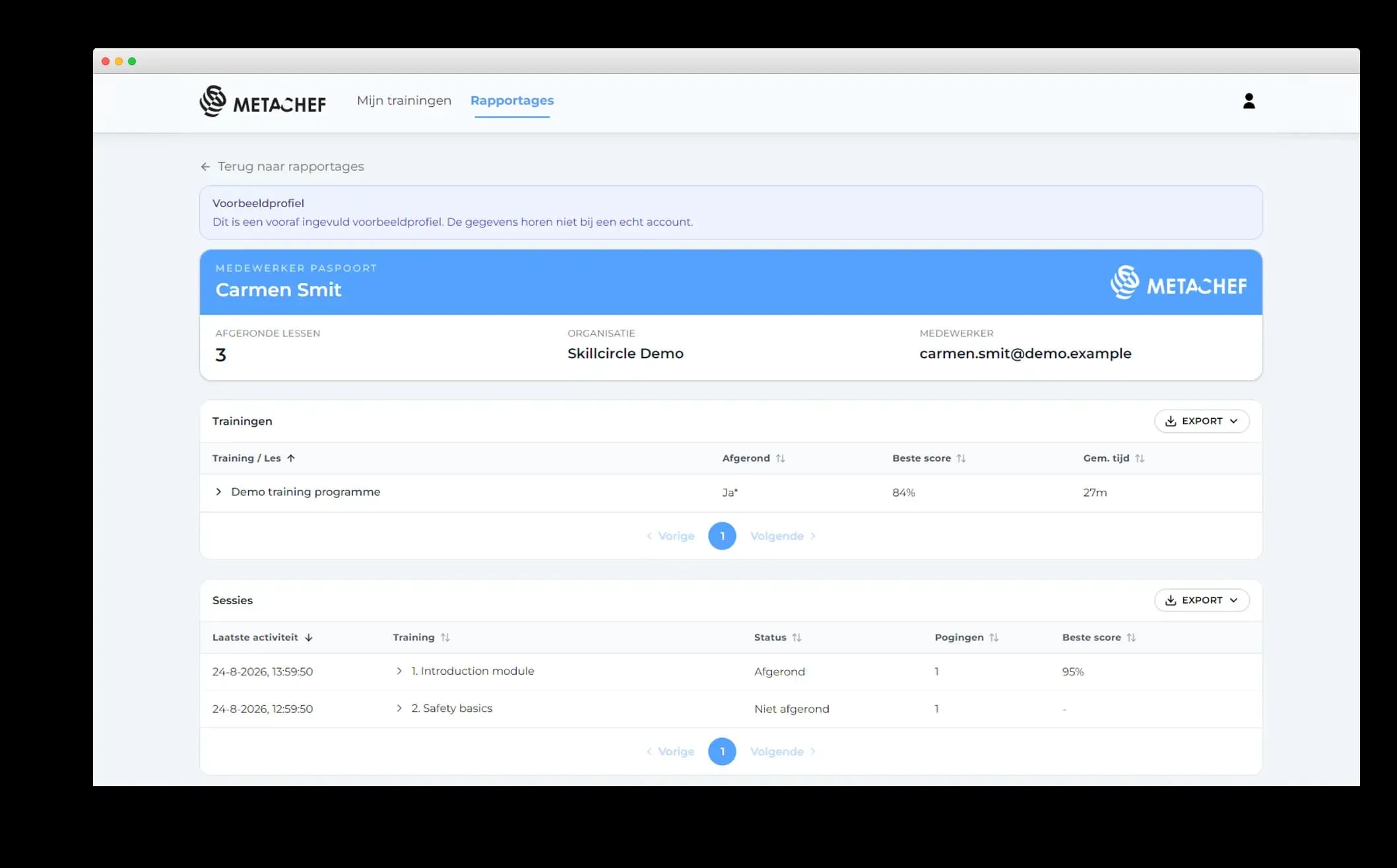
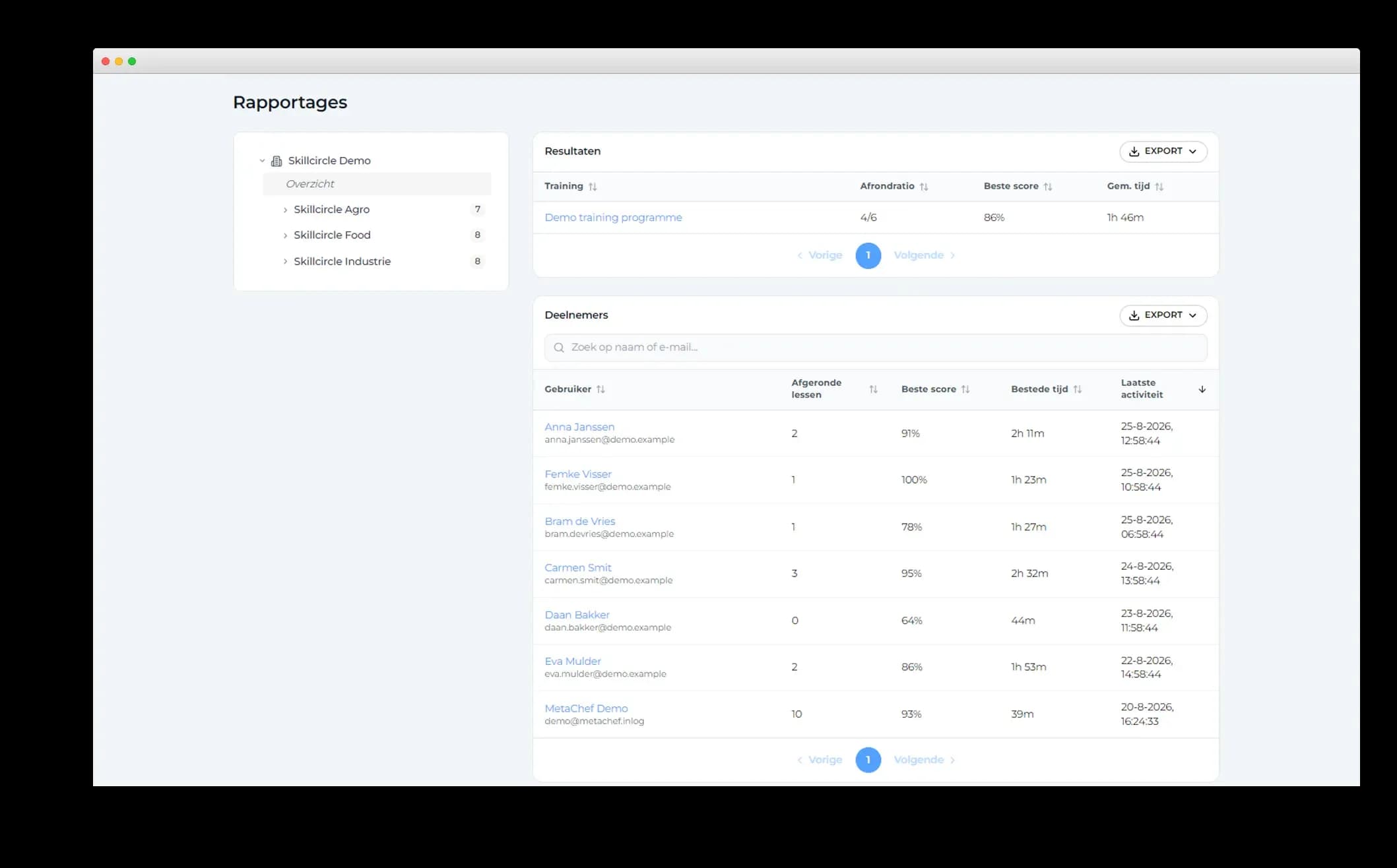
In the MetaChef portal, you can see for each employee which training courses have been completed, how much time was spent on them, and what scores were achieved on the knowledge checks. You can export reports as CSV or PDF files, which are immediately usable for the Dutch Labor Inspectorate, RI&E follow-up, or audits. This allows you to specifically fulfill the information and training obligations under the Working Conditions Act.
Multilingual safety instructions on every phone
The training is entirely mobile-based: no computer, classroom, or instructor required. The multilingual instructions are accessible to employees with varying language and reading levels. The 3D images ensure that the material is understood even by those with limited reading skills—especially through the use of icons, which everyone can recognize regardless of language. Temporary workers can even complete the training before their first day on the job.
Do your employees also work with machines or perform task-specific procedures? Combine this module with visual 3D work instructions for on-the-job training.
Language support
Multilingual
For everyone
Suitable for limited reading skills
Fully mobile
No computer or classroom needed
Independent
No supervisor required
User analytics
Insight into each employees progress
Standalone or modular
Combine exactly what fits





Start this week
Skillcircle is ready to go: in week one, we configure accounts and the connection to your HR or planning system; in week two, the first employees go live. From then on, you train continuously and repeat instruction where the data shows it is needed.
Week 1
Set up
Create accounts and set up the connection with HR or planning system.
Week 2
Go live
First employees go live.
Ongoing
Keep training
Repeat training for audits, new tasks or after incidents. Use data and feedback to make targeted adjustments.
See how it works
Start your demo and explore the basic safety & pictograms training alongside the rest of the Skillcircle programme.

Frequently asked questions about basic safety & pictograms
Are safety instructions mandatory for new employees?
Yes. The Working Conditions Act (Article 8) requires you to effectively inform and train your employees about the risks associated with their work and the measures to mitigate those risks before they begin work, including on their first day on the job. A certificate is not required; however, verifiable training is. This training provides that instruction and issues proof for each employee.
What safety signs and symbols do employees learn to recognize?
The four main categories found in every workplace: prohibition signs (round, red and white), warning signs (triangular, yellow and black), mandatory signs (round, blue), and emergency signs (rectangular, green). Employees learn not only the meaning of each sign but also what each sign requires of them in practice. You explain company-specific signage and zoning in your own work instructions.
Does the training replace our emergency response team or our evacuation plan?
No, it lays the groundwork. Your emergency response team members retain their roles, and your evacuation plan remains the guiding principle; the training ensures that all employees can recognize and report unsafe situations, know the evacuation signal, and know what to do until the emergency response team takes over. You explain your specific evacuation routes and assembly point in your own instructions.
Is the training also suitable for temporary and flexible workers?
Yes! This is especially important for temporary workers: as the hiring company, you’re responsible for their safety and training, just as you are for your permanent employees. Temporary workers complete the training on their own smartphones, even before their first day on the job, if necessary, so they’ve received the basic training before they start working. No supervisor or scheduled session is required.